Google CSS – What are Comparison Shopping Services, How Do They Work, and How Do You Benefit?
source: own elaboration
In today’s hyper-competitive e-commerce landscape, every fraction of a percent in margin and every dollar saved in the advertising budget matters immensely. Online stores are constantly searching for ways to optimize their Google Shopping campaigns. One of the most effective, yet still underutilized solutions, is using third-party comparison shopping services – known as Google CSS (Comparison Shopping Services).
What exactly are these services, where did they come from, how do they function, and—most importantly—how can they increase your store's profits? Let’s find out.
Where did Google CSS come from? A brief history
To understand what CSS is, we have to go back to 2017. At that time, the European Commission imposed a record fine of €2.42 billion on Google for anti-competitive practices. The Commission ruled that the tech giant was favoring its own comparison shopping service (Google Shopping) in search results, thereby discriminating against third-party competitors.
To comply with EU law, Google had to open its advertising space (the "Shopping" tab and the product carousel in the main search results) to external entities. This led to the creation of the Google CSS Partner program. Since then, third-party partners have been able to display product ads on behalf of online stores on the exact same terms as Google itself.
What exactly is Google CSS?
Google CSS is a service that collects product offers from various online retailers and submits them to Google to be displayed as Product Listing Ads (PLA).
It is important to realize one key thing: Google Shopping is also a CSS. When you set up a standard Google Merchant Center account, you are by default using the CSS service owned by Google. However, you have the right to change this provider to an independent partner.
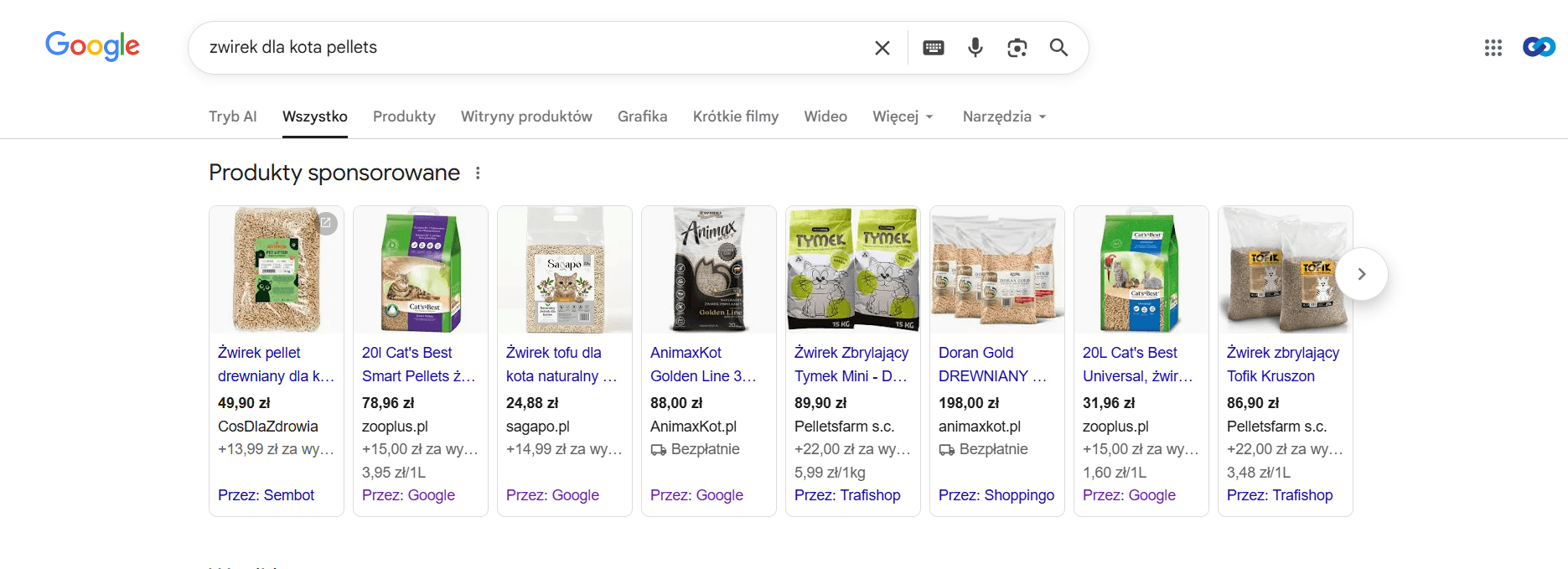
For the end customer, the difference is virtually invisible. The ad looks identical—containing a photo, title, price, and store name. The only change is a small grey label at the bottom of the ad. Instead of "By: Google," the user will see "By: [Your CSS Partner's Name]."
How does it work in practice? The auction mechanism
Product ads in Google are based on an auction model. The winner is the one who offers the highest Cost Per Click (CPC) combined with a high Quality Score.
When you use the default Google Shopping CSS, Google deducts a margin of approximately 20% from your CPC bid before it even enters the auction. Example: If you bid €1.00 for a click, Google takes a €0.20 margin. Only €0.80 actually enters the auction to compete for the ad position.
However, if you use a third-party Google CSS partner, Google does not take this margin. Example: You bid €1.00 through an external CSS. The full €1.00 goes into the auction system.
This means that for the same amount of money, you gain 25% more bidding power (since €0.80 increased by 25% equals €1.00). Third-party partners usually charge a flat, affordable monthly subscription fee, which for most advertising budgets is a fraction of what Google’s hidden margin consumes.
What benefits will switching to a third-party CSS bring you?
Switching to a CSS partner is one of the simplest ways to optimize your e-commerce campaigns. Here are the main benefits:
1. Cost Savings and Lower CPC
By bypassing Google’s 20% margin, you pay less for the same clicks. You can maintain your current budgets and acquire traffic much more cheaply, which translates directly into savings of hundreds or thousands of dollars per month.
2. Increased Reach and Visibility
If you keep your CPC bids at their current level, your bidding power will automatically increase. This results in your products appearing more often, in higher positions, and for more competitive search terms. This allows you to capture additional traffic from Google that was previously out of reach.
3. Improved ROAS (Return on Ad Spend)
A lower cost per click with the same conversion rate leads directly to increased profitability (ROAS). Campaigns that were previously barely breaking even can suddenly become highly profitable.
4. Seamless Migration Process
Switching to an external CSS does not require pausing campaigns, creating new ad accounts, or "re-training" Google’s algorithms. The entire process involves simply linking your existing Google Merchant Center account to the CSS partner’s service. Your account history, data, and campaign performance remain intact. The transition happens smoothly in the background.
Summary
Integrating a third-party Google CSS partner into your e-commerce strategy is no longer just an "innovative trick"—it is a market standard for stores that are serious about their budget. It provides higher bidding power in Google Ads, lowers click costs, and allows you to squeeze the maximum value out of every cent spent on product advertising. By moving away from the default Google Shopping CSS, you reclaim your margin and gain a competitive edge over stores that are still "overpaying" on standard settings.
Are you wondering how these mechanisms will work for your business? If you want better, cheaper, and more effective campaigns, get in touch with us. Our comparison shopping engine, trafishop.pl, might be exactly what you need to outpace the competition.
Let’s talk about how we can improve your results.